Whether you’re comparing options after outgrowing Absorb, feeling boxed in by Canvas, or questioning the cost of Blackboard, the real decision comes down to how much control and flexibility your organisation actually needs from its next LMS.
Rather than a straight list of alternatives, this article gives you a framework for evaluating the options you’re already comparing. Whether you’re trying to find the best LMS to switch from Absorb or weighing up a move away from another platform, it will help you work out what matters for your organisation before you commit to anything.
What to actually compare when evaluating LMS alternatives?
Comparing LMS alternatives properly means looking past the marketing and focusing on a handful of things that determine how well a platform will serve your organisation over time.
Cost structure matters more than the sticker price. A licence fee, a subscription, and an open source platform hosted by your own team or a partner all carry very different long-term costs, and the cheapest option upfront isn’t always the cheapest over several years.
Customisation and the plugin ecosystem decide how much your organisation can shape the platform to fit your workflows, rather than working around whatever the vendor has built in. Support model matters too: who will you be dealing with when something goes wrong, how well will they know your setup, and will they be working in your time zone? Data ownership and security are worth asking about directly as well: where does your data live, who controls it, how is it protected, and what happens to it if you ever want to leave?
Proprietary vs. Open Source: The real difference
Most LMS platforms fall into one of two broad categories, and knowing which one you’re looking at explains a lot about what you can and cannot do with it.
A proprietary platform is built, priced and controlled entirely by its vendor. They decide the roadmap, what features ship and when, how much customisation is allowed, and what it costs to access any of it.
An open source LMS like Moodle works differently. The code itself is publicly available, so you’re not locked into one vendor’s roadmap, and you’re free to customise and extend the platform to suit your organisation. Pricing is separated from the software itself, since you’re paying for hosting, support and implementation rather than a licence to use the platform.
Neither approach is automatically right for every organisation. What changes is who holds the control, and how much of that control your organisation wants to take on.
Why Moodle is worth considering
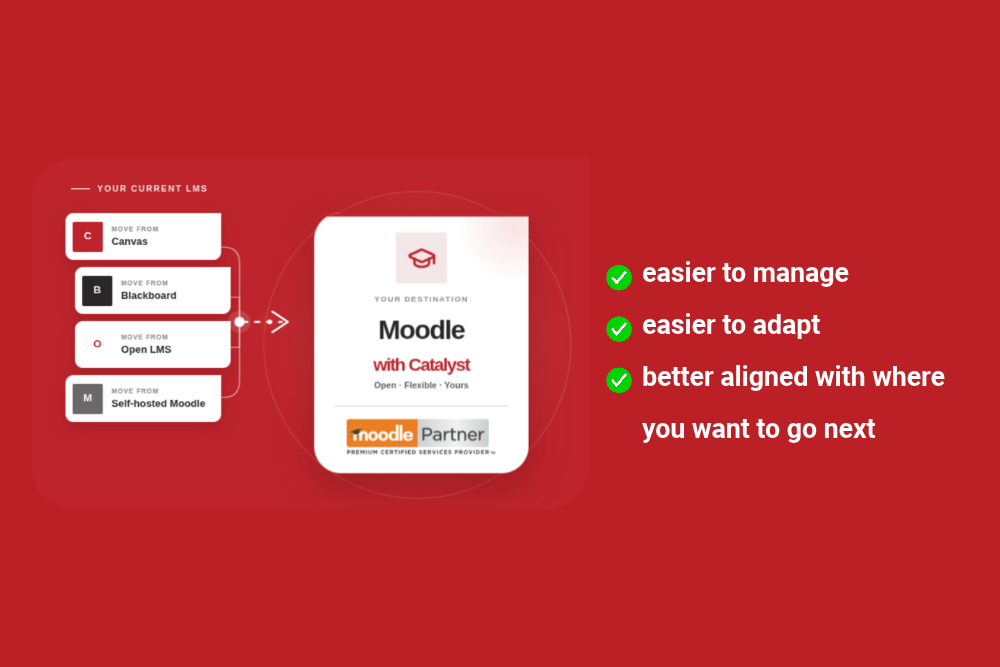
If you’re looking to switch from an expensive LMS, Moodle is worth a close look, largely because of what its open source foundation gives you.
Since Moodle isn’t tied to a single vendor’s pricing model, organisations that switch usually see the cost structure change shape entirely. You’re paying for hosting, support and the specific features you need, rather than a licence fee that scales with user numbers regardless of what you use.
The plugin marketplace is large, with more than 2,000 plugins covering everything from assessment and analytics to integrations with student management systems. Where an existing plugin doesn’t do exactly what you need, the open architecture means a custom one can usually be built instead.
Catalyst has worked exclusively with open source software, and Moodle in particular, for more than two decades, and our team includes some of the largest contributors to Moodle’s core code in the world. That depth of experience is worth factoring in, whichever platform you’re moving away from.
What switching actually looks like
Switching platforms generally follows the same broad shape regardless of which LMS you’re moving from or to: understanding what you have now, planning the move, migrating your content and data, testing everything properly, and supporting your team through the transition.
If you’ve already settled on Moodle as your destination, our team can guide you what the move looks like from Canvas, Blackboard or Open LMS. And if you’re still weighing up whether switching is worth the disruption at all, our article on whether switching LMS providers is easier than you think tackles that concern directly.
Frequently Asked Questions
Is Moodle a good alternative to Absorb, Canvas or Blackboard?
For organisations that want to own their platform rather than rent it, yes. Moodle won’t suit everyone, but if control over cost, customisation and data is a priority, it’s one of the strongest options on the market.
What’s the difference between an open source and a proprietary LMS?
A proprietary LMS is built and controlled entirely by its vendor, who sets the roadmap, the pricing and what customisation is allowed. An open source LMS like Moodle makes the code itself publicly available, so your organisation, or an implementation partner like Catalyst, can host, customise and extend it without needing the vendor’s approval.
How much does it cost to switch to an open source LMS like Moodle?
Cost depends on the size of your organisation, how much customisation you need, and who hosts and supports the platform for you. Rather than a licence fee, you’re typically paying for hosting, implementation and ongoing support, which usually works out to be more predictable over time than a per user subscription. Book a free consultation for a clearer picture based on your setup.
Can Moodle do everything a paid LMS platform can?
For most organisations, yes. Moodle covers the core features you’d expect from any modern LMS, and its plugin marketplace and open architecture mean it can be extended well beyond what many proprietary platforms offer out of the box. Where a specific feature isn’t available, it can usually be built. If there’s something your current platform does that your team relies on, we’ll check it as part of discovery.
Talk to Us About Your Options
If you’re still weighing up your options, we’re happy to talk them through with you, including whether Moodle is the right fit for your organisation at all. Book a free consultation and we’ll give you a clear, no-pressure view of what a switch would involve.
Book a Free Migration Consultation
For a broader look at switching your LMS, see our full LMS to LMS Migration Services page.