
Every semester start is like clockwork.
Thousands of students return. Timetables are released. Course pages open. Assessment links appear.
Within minutes, sometimes seconds, entire cohorts log in at once.
From the outside, it feels simple: you click “Login” and your course loads.
Behind the scenes, however, an enormous amount of engineering goes into making sure that first experience of semester is smooth, fast, and reliable.
Our team here at Catalyst, look after some of the largest Moodle LMS instances in the Southern Hemisphere. Some of our clients serve hundreds of thousands of students. If you ever wondered what a technical team does to ensure students get the strong start they deserve, let’s take a look at what we do for our clients:
‘Planning to fail’ instead of failing to plan: Designing for spikes, not averages.
Most systems are built for average load.
Semester starts are not average!
We regularly see the following scenarios:
- 5 or 10 times normal traffic within minutes
- Entire faculties logging in simultaneously
- Sudden bursts when lecture recordings or announcements go live
If we scaled purely based on 70-80% CPU usage, we’d already be behind.
Instead, we deliberately scale early.
Autoscaling at 50% CPU
At Catalyst, we configure autoscaling policies so that additional application servers are launched when CPU reaches around 50% utilisation.
Why 50%?
Because it ensures:
- Immediate headroom for sudden spikes
- No queue buildup under burst traffic
- Capacity to survive an entire Availability Zone failure without performance collapse
Time-based scaling: Getting ahead of the curve.
Autoscaling reacts. Time-based scaling anticipates.
- We know when semester begins.
- We know when timetables are released.
- We know when major assessments open.
- We know what a normal daily traffic pattern looks like.
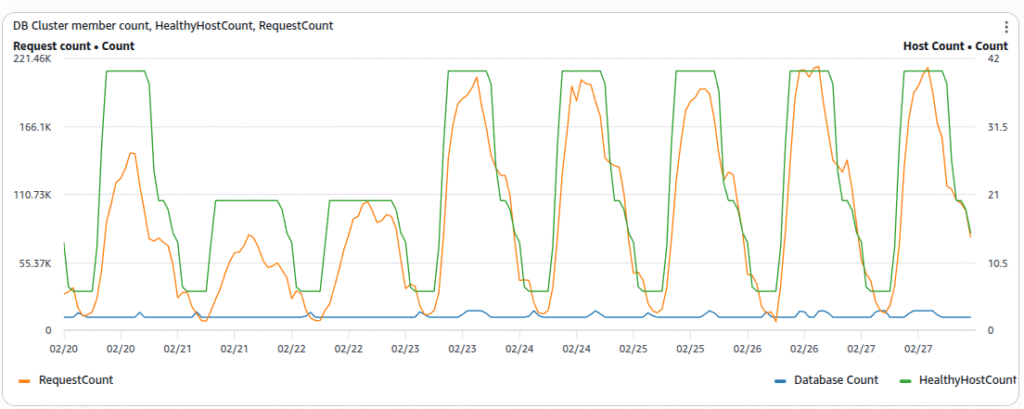
So we scale before those events occur. Hours before peak traffic windows, we:
- Increase minimum task counts
- Pre-warm instances
- Ensure container clusters are already running at elevated capacity
This avoids the cold-start delay that can occur if scaling only happens reactively.
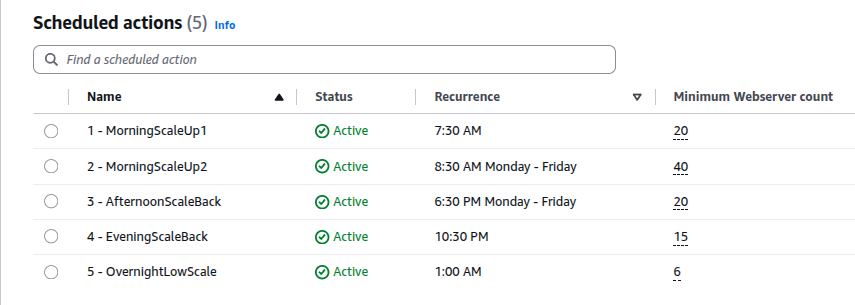
In short, when the rush arrives, the capacity is already there.
Monitoring everything! (and then monitoring the monitoring)
Visibility is critical during semester start.
We maintain detailed dashboards that cover:
- Application CPU and memory
- Request latency
- ALB request counts and target response times
- Database connection counts
- Cache hit ratios
- Background task throughput
- Healthy Webserver and Database server counts
- Error rates
- Network and disk throughput
These dashboards are monitored closely during key windows and we frequently share these key dashboards directly with our clients.
Parallel to that, we use icinga2 to actively monitor all of key metrics (and there are many) every minutes, and send a pager alert to our 24/7 Follow the Sun support and infrastructure team.
If something drifts, even if slightly, outside expected patterns, we know within seconds.
Concurrent user monitoring.
Using our Cloud metrics plugin, we expose live concurrent user counts directly from within Moodle.
This lets us answer questions like:
- How many students are active right now?
- Are we seeing a true load spike or just bot traffic?
- How does the number of users compare historically?
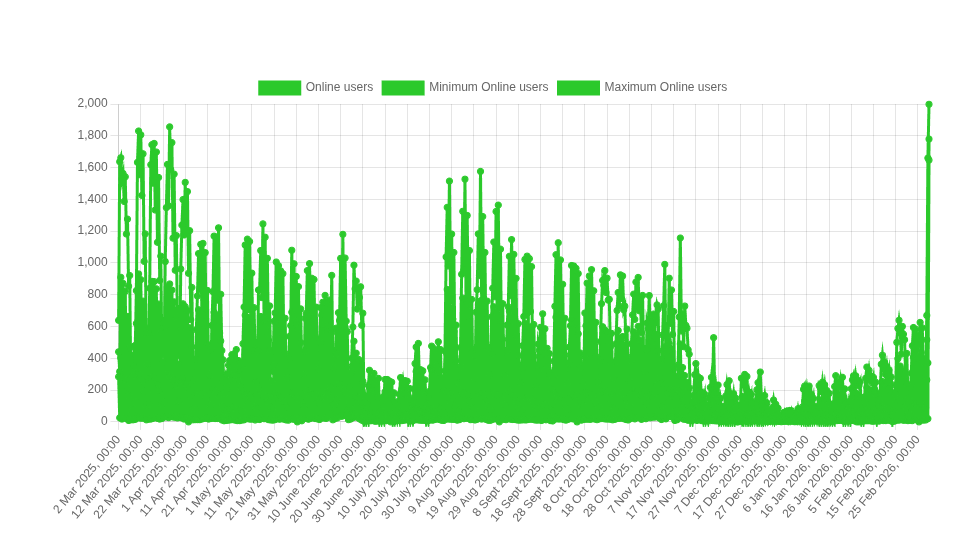
Often this metric is far more meaningful than CPU alone and just one of the many custom metrics we use.
Understanding user behaviour with Matomo.
Infrastructure tells us how the system is behaving. Analytics tells us how users are behaving.
We use Matomo to understand:
- Where users are arriving from (email, LMS dashboard, external links)
- What pages within the LMS they are using.
- Whether login flows are smooth
- If students are struggling to find specific content
- Where in the world students are using the LMS from
- Which devices are being used
This helps us improve on-boarding experience, not just system performance.
We believe that performance is important and usability is critical.
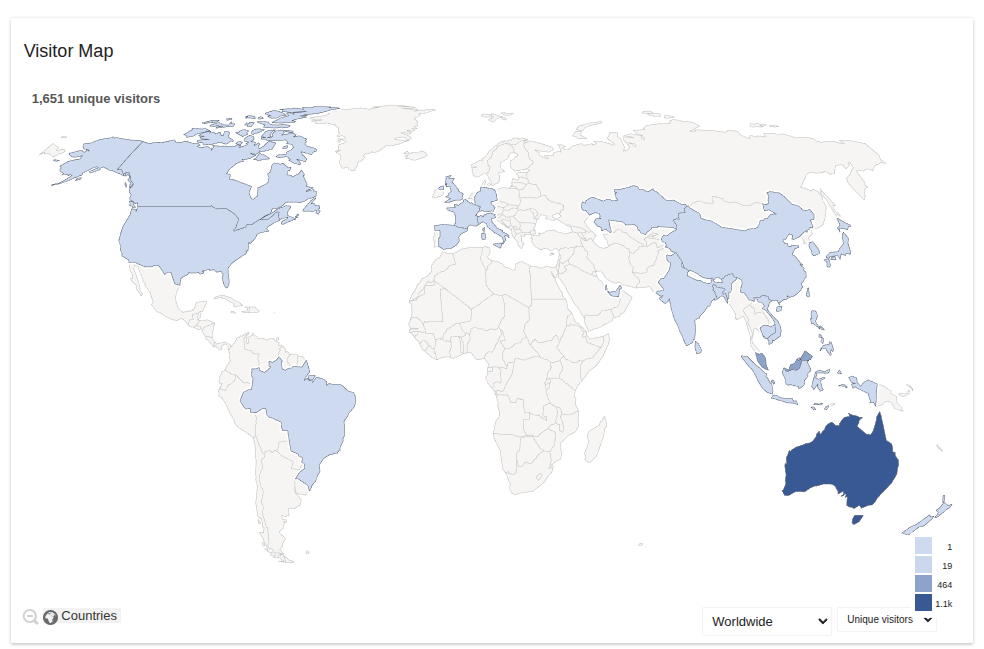
There is a global trend to see more and more mobile device usage every year with the developing world particularly heavy on mobiles.
Talk to our team about your own Branded Moodle App

Database scaling: a few tricks.
The database is often the most sensitive part of the stack during semester start.
At Catalyst, we ensure that:
- Read replicas are ready and configured to scale, based on load and time based rules
- Connection pooling is tuned for burst traffic
- Index health and vacuuming are up to date before semester
- Slow queries are eliminated well in advance
But one of the biggest performance wins is something less visible:
Keeping traffic in the same availability zone.
Where possible, we design infrastructure so that Application container connection to the Database happens inside the same Availability Zone.
Why? Because:
- Cross-zone (Between-Data-Centers) traffic adds latency
- Cross-zone traffic incurs additional AWS charges
- Keeping traffic local improves both speed and cost efficiency
It’s faster and it’s cheaper.
We don’t advertise this to students but they feel it every time a page loads instantly.
Planning for the worst = Delivering the best
Semester start is a stress test.
We assume that:
- Traffic will spike beyond expectations
- Something will fail
- A data center may disappear
- A large cohort will all click the same link at once
And we engineer so that none of that matters.
Students don’t see:
- Autoscaling groups expanding
- Containers launching
- Database read replicas serving burst traffic
- Dashboards lighting up in real time
They just see:
- Fast page loads
- Successful logins
- Courses ready to go
And that’s the point. Happy user means happy client, means Catalyst goal achieved.
Final thoughts:
A good start to semester sets the tone for everything that follows.
Behind every smooth login is:
- Careful capacity modelling
- Conservative scaling thresholds
- Proactive time-based scaling
- Deep observability
- Smart database design
- Continuous optimisation
When thousands of students return to study, we’re ready long before they arrive. Making technical problems disappear and where possible, prevent them from happening is what our team at Catalyst does. We believe that the best infrastructure is invisible.

Alex Lawn brings over 20 years of experience at Catalyst IT, where he leads the Operations and Infrastructure team. A seasoned expert in AWS architecture, Linux systems, and high-performance Moodle hosting, Alex has played a key role in scaling some of the largest Moodle environments in the southern hemisphere. With a deep understanding of the demands of higher education, he specialises in infrastructure automation, performance tuning, and resilient cloud-native deployments.